


When a site is handed to us, the first thing we ask for is Search Console access. Not analytics, not the hosting login, not the list of keywords somebody was targeting three years ago. Search Console, because it is the only record of what Google has actually been doing with the site, and it is usually the first time anyone has read it properly.
Here is roughly the order we follow, and why each step comes where it does.
Check the property before reading a single number
Search Console properties come in two kinds and they do not measure the same thing. A domain property, verified by DNS record, covers everything on the domain including subdomains and both protocols. A URL prefix property covers exactly one address.
Sites verified the second way are frequently split across several properties that each hold part of the truth. Someone reports a traffic collapse that turns out to be a migration from one address to another, with the numbers sitting in a property nobody opened. Before any analysis, confirm which kind you are looking at. If it is a prefix property, the first job is setting up the domain one and waiting.
Read impressions and clicks as two separate stories
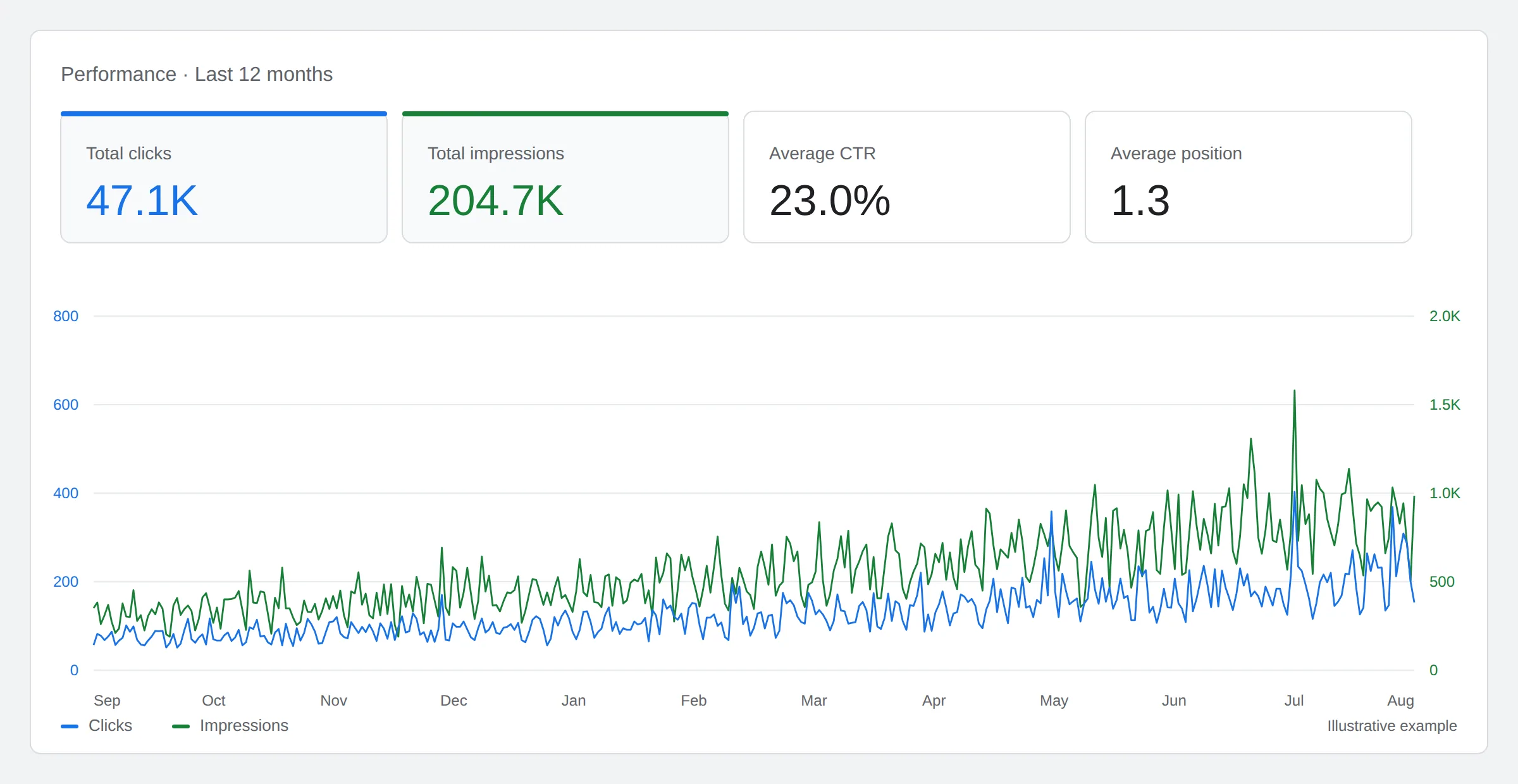
That is the shape you are hoping to see: impressions and clicks both climbing, with average position falling toward the top of the page.
Read the two lines against each other rather than on their own. Clicks climbing while impressions stay flat means the site is not reaching more people, it is converting the same reach more often, usually because it moved up the page. That says nothing about producing more content. It says the pages that already exist got closer to where clicks happen.
The opposite pattern, impressions climbing while clicks stay flat, is the one people misread most often. It looks like growth on a dashboard and it usually means a site is being shown for a wider set of terms it does not deserve to rank for.
Strip out the brand
Every site’s best query is its own name. It converts several times better than anything else and it is not the result of any work. Left in the numbers it lifts every average and conceals whatever is happening in the terms you compete for. Filter it, then look again. The second number is the real one.
Look for the pages Google likes and readers skip
Sort by impressions, then read clicks. Pages with plenty of the first and almost none of the second are the shortest path to more traffic on any site, because the expensive part is finished. Google has decided the page belongs in the results. The title and description are failing to close it. Rewriting two lines of text on a page that already ranks beats writing a new page nobody has heard of.
Watch for queries that are not keywords
Increasingly, what turns up in Search Console is not a search term. It is a sentence. “How do I find reliable IT support for schools or municipalities.” “Are there local providers who specialize in comprehensive water testing.” Some are follow ups so short they only make sense as part of a conversation.
Those come from people using AI answer tools, and Google folds those impressions into ordinary web search without marking them. They share a pattern: they gather impressions and almost never produce a click. On one site we looked at, that class of query drew 3,959 impressions and zero clicks over ninety days, at an average position of 12.5. Ranked well, cited presumably, visited never.
We do not think that is a reason to panic, and we are wary of anyone selling a cure. It is a reason to know your number, because for some businesses the metric is tiny and for others it makes up most of their visibility.
Two ways to stop doing this by hand
The steps above take manual work to complete. It is worth doing manually once, so you know what automated tools are doing. After that, repeating the manual process each month is the part that often stops happening.
BizScoreAI is the right fit if you are a business owner rather than a marketer. You claim your listing, connect Google Analytics and Search Console, and your own search data is read for you and attached to your listing. It handles the mechanics it describes: pulling the full query set instead of the top few, separating brand from non-brand, flagging pages that get seen but not clicked, grouping the conversational queries, and comparing each period against the last. You are given a short list of what to do, not another dashboard to interpret.
SEOScanPRO is the right fit if you already work on sites. It connects the same accounts, then sets the audit against the performance data so each explains the other. Search Console tells you a page lost half its clicks. The audit tells you the page now takes six seconds to load and its title was rewritten in a theme update. Neither half is worth much alone, and putting them together is most of what a technical SEO review consists of.
If you want a person to read it rather than a tool, that is what we do. Either way, get Search Console verified with a domain property today, because it only records from the day it is connected and there is no way to recover the months you did not have it.
Want help with this in Myrtle Beach or Long Island? Talk to us.
NewSunSEO
Grow in Google and AI Search
AI-SEO, local search, paid ads and websites from one team, with offices on Long Island and in Myrtle Beach.
- AI-SEO
- Local AI-SEO
- AI Consulting
- PPC
- Web Design
- Web Development
- Long Island Office(631) 320-1700
- Myrtle Beach Office(843) 492-7131
Request a Free Proposal
Tell us about your business and where you want to grow.
We will reply by email to talk through your goals and what a proposal would include.
We use your details only to reply to you and send what you asked for. See our Privacy Policy.

