



Readers can now reach every review on a Google Business Profile only after signing in to a Google account. The change also blocks unsigned visitors from sorting reviews or posting their own, and it adds a sign-in prompt whenever someone tries to expand a listing’s review section. The likely reason is to make it harder for AI platforms, bots, and other third parties to scrape review content at scale.
What changed on Google Maps
Clicking “see more reviews” or “sort” on a Business Profile no longer opens the full review list. Instead, Google Maps shows a sign-in panel titled “Sign-in to get the best of Google Maps.” The panel lists what an account provides:
- Reviews and photos: read and search through every review and photo.
- Saved places: keep track of favorites with lists that you can share.
- Personalized travel: get instant travel times to frequent places like home and work.
The prompt appears across the same actions that previously worked without an account: expanding a truncated review list, applying a sort filter, and opening the form to leave a review.
Why Google is gating reviews
Google did not publish a formal reason, but the move lines up with a long-running effort to slow automated scraping of Business Profile content. AI assistants, comparison tools, and review aggregators have been pulling review text from Google Maps to feed training data and to populate their own product pages. By requiring an authenticated session, Google forces every reader through a real Google account, which is a much stronger signal than an anonymous browser request and is much easier to throttle or ban when used for bulk harvesting.
For everyday users the cost is small: a single sign-in provides access to the full review list, sorting, and review submission. For scrapers and AI pipelines, the cost is large, because accounts can be suspended and request rates can be capped per signed-in identity.
What businesses and reviewers should know
Local businesses may see short-term effects. Anonymous browsers who would have skimmed a long review list before choosing a business will now hit a wall and have to decide whether to sign in. Most consumers already have a Google account, so the friction is low for them, but the visible review count and the snippet Google shows without sign-in become more important than ever, since they are now the only review content a visitor sees before authenticating.
Reviewers lose the option to post anonymously through a clean browser session. Anyone leaving a review must do so while signed in, which means the review carries a real account identity and is tied to the user’s profile and history on Google.
How to keep working with Google reviews
- Sign in once with a personal Google account to read the full list and sort by newest, highest, or lowest rating.
- Use the short snippet shown before sign-in as the hook that earns the click on “see more reviews.”
- For businesses, invest in the first three to five reviews shown, because they are the only ones an unsigned visitor will read in full.
Rank position across a service area is what a geo grid report shows, and SEOScanPRO‘s GEO Grids do this, so a business can see exactly where its Google Business Profile is being seen and where it is not.
FAQ
Why does Google Maps now require sign in to read all reviews?
Google Maps now requires a Google account sign-in to read the full list of reviews on a Business Profile, to sort them, and to leave a review. The likely goal is to block bots, scrapers, and AI platforms from harvesting review data at scale.
Can you still see some Google reviews without signing in?
Yes. Google still shows a short snippet of reviews and the overall star rating to unsigned visitors, but clicking “see more reviews,” sorting, or submitting a review now triggers a sign-in prompt.
What happens if you do not sign in to Google Maps?
You can still view a business’s basic profile, photos, and the short review snippet, but the full review list, sort options, and the ability to post a review are locked behind a Google account sign-in.
Related coverage
- Stop Losing Google Reviews: The QR Code Mistake That’s Costing Local Businesses
- How to Read Google Search Console’s AI Performance Reports
SEOScanPRO
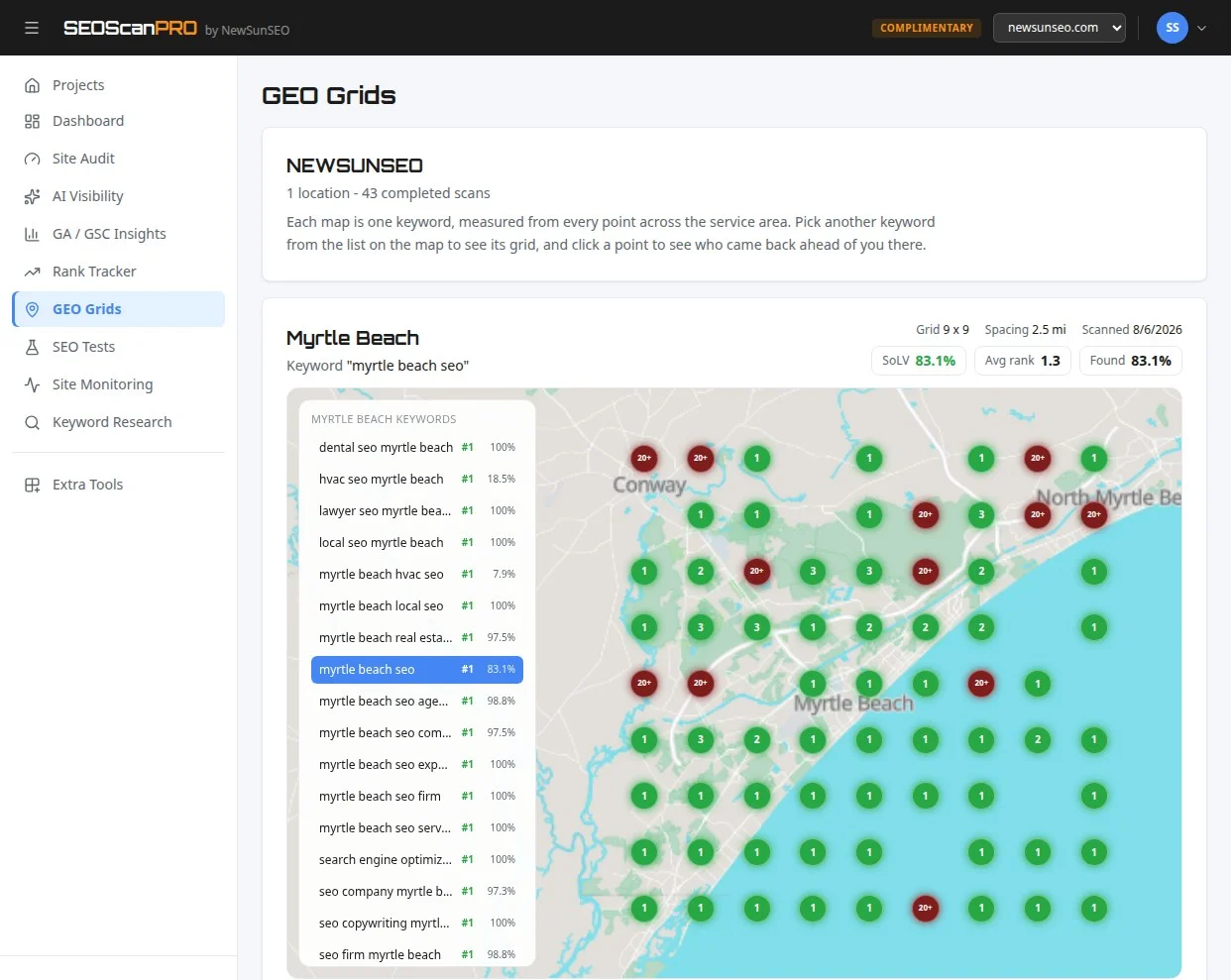
SEOScanPRO’s geo grid tool runs a full technical audit of a site and shows the measured result behind every check. Open the geo grid tool.
Want help with this in Myrtle Beach or Long Island? Talk to us.
NewSunSEO
Grow in Google and AI Search
AI-SEO, local search, paid ads and websites from one team, with offices on Long Island and in Myrtle Beach.
- AI-SEO
- Local AI-SEO
- AI Consulting
- PPC
- Web Design
- Web Development
- Long Island Office(631) 320-1700
- Myrtle Beach Office(843) 492-7131
Request a Free Proposal
Tell us about your business and where you want to grow.
We will reply by email to talk through your goals and what a proposal would include.
We use your details only to reply to you and send what you asked for. See our Privacy Policy.

