


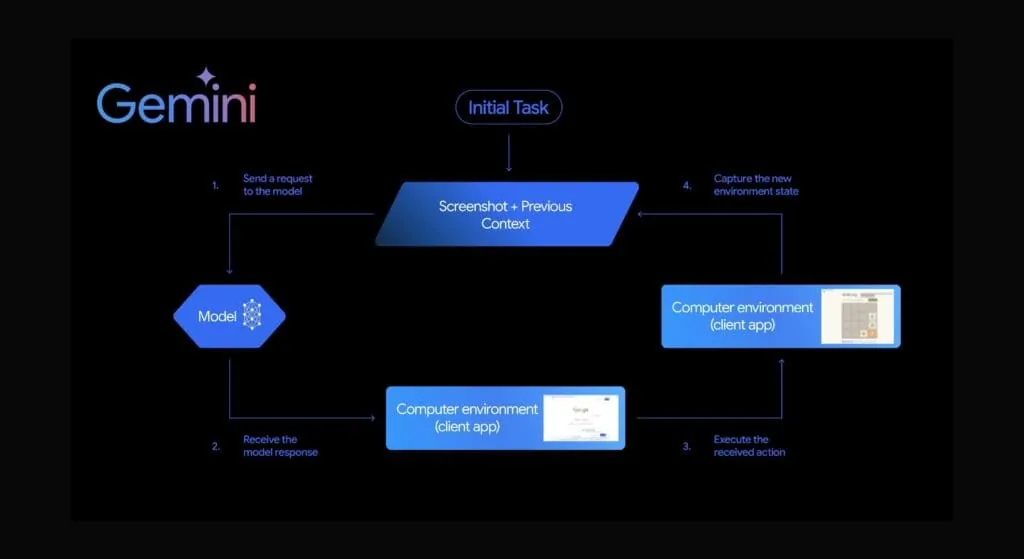
Google has released the Gemini 2.5 Computer Use model, a specialized variant built on Gemini 2.5 Pro that enables AI agents to interact directly with graphical user interfaces. The model is available in public preview through the Gemini API on Google AI Studio and Vertex AI, and it targets web browsers as the primary environment for agent-driven automation.
What Is the Gemini Computer Use Model?
Unlike models that rely on structured API calls, Computer Use is designed to operate software the way a person would: by reading a screen, clicking buttons, filling in text fields, and navigating menus. The underlying framework is capable of extending to other interfaces over time.
How Does the Model Process Screens?
These inputs include:
- A user request describing the task to perform.
- A screenshot of the current interface.
- A history of recent actions the agent has already taken.
From this context, the model returns one of four function calls that the developer’s client code must execute:
- at: a click or tap at specific coordinates on the screen.
- type: a text entry into an active input field.
- key: a keyboard action such as pressing Enter or Tab.
- scroll: a directional scroll within the viewport.
After the client executes the action, it sends an updated screenshot back to the model, creating a loop that continues until the task is finished or the model determines that human input is required.
What Safety Controls Are Built In?
Because the model operates real software with real data, Google has built in several safeguards. Developers can configure a system instruction that constrains the agent’s behavior, and they receive a per-turn safety_decision field with one of three values:
- default: the action is allowed to proceed.
- require_human_confirmation: the client must pause and obtain user approval before executing the action.
- block: the action is not executed.
This structure lets applications require explicit consent for sensitive steps, such as submitting a form or completing a purchase, without halting the entire workflow.
How Does It Perform and Where Is It Available?
Google’s documentation benchmarks the model on web and mobile control tasks, including Online-Mind2Web, WebVoyager, and AndroidWorld, where the 2.5 Computer Use model reportedly outperforms comparable baselines on several metrics. The model is accessible via the Gemini API under the name gemini-2.5-computer-use-preview-10-2025, and developers can experiment with reference implementations in Google AI Studio.
What Are Developers Building With It?
The Computer Use capability opens up agentic workflows that previously required brittle scripted automation or custom integrations. Use cases mentioned in the documentation and early ecosystem reporting include form filling across multiple sites, data entry into legacy web applications without APIs, UI-based testing, and task automation in sandboxed environments.
Because the model works from screenshots rather than DOM structure, it can interact with interfaces that lack accessibility metadata or that change frequently, situations where traditional browser automation tools tend to break.
What Limitations Should You Keep in Mind?
Computer Use is a preview release. The model is optimized for browsers and may not perform reliably on desktop operating systems or complex enterprise software. Latency is higher than a single text completion because each turn involves a screenshot round-trip. Developers are responsible for enforcing scopes, capturing confirmations for high-risk actions, and monitoring agent behavior in production.
How Do Developers Get Started?
Developers can access the model through the Gemini API on Google AI Studio or Vertex AI. Reference code is published in the Google ADK samples repository, including a basic loop that handles screenshot capture, action execution, and safety decisions. From there, teams typically add domain-specific guardrails, custom function definitions, and logging suited to their environment.
FAQ
What is the Gemini Computer Use model?
It is a specialized variant of Gemini 2.5 Pro that lets AI agents interact directly with graphical user interfaces by reading screens and issuing click, type, key, and scroll actions, available in public preview through the Gemini API on Google AI Studio and Vertex AI.
How does the model decide what to do on a screen?
It combines the user’s task request, a current screenshot, and a history of recent actions to return one of four function calls (at, type, key, or scroll) that the developer’s client code executes, looping with updated screenshots until the task completes.
What safety controls does Computer Use provide?
Each turn returns a safety_decision of default, require_human_confirmation, or block, letting developers pause for user approval on sensitive steps like form submission or purchases while still allowing non-sensitive actions to proceed.
Want help with this in Myrtle Beach or Long Island? Talk to us.
NewSunSEO
Grow in Google and AI Search
AI-SEO, local search, paid ads and websites from one team, with offices on Long Island and in Myrtle Beach.
- AI-SEO
- Local AI-SEO
- AI Consulting
- PPC
- Web Design
- Web Development
- Long Island Office(631) 320-1700
- Myrtle Beach Office(843) 492-7131
Request a Free Proposal
Tell us about your business and where you want to grow.
We will reply by email to talk through your goals and what a proposal would include.
We use your details only to reply to you and send what you asked for. See our Privacy Policy.

